What happens when a user or search engine follows a link on your page today?
If that path leads to an error, a redirect chain, or a blocked resource, the impact goes beyond a bad click. Link health directly affects trust, usability, and how your page is evaluated by search engines and AI systems.
Why Link Health Matters
Links shape how a page is experienced and understood. For users, they guide navigation and create flow. For search engines, links provide structure, context, and signals of reliability.
When links fail or behave inconsistently, users hit friction and abandon sessions earlier. At the same time, crawlers may spend time on inaccessible or unstable URLs, reducing crawl efficiency. Over time, these issues accumulate across pages and quietly weaken performance.
Why Manual Link Checks Fall Short
Manually checking links might work for a small page, but it doesn’t scale. As content grows, links change, external sites move, and new issues appear without warning.
Manual checks are:
- Time-consuming and inconsistent
- Easy to miss edge cases like redirects, timeouts, or blocked access
- Difficult to repeat regularly across many pages
As a result, link issues often remain unnoticed until they start affecting user experience, crawlability, or performance.
Introducing the Page Links Analyzer
The Page Links Analyzer is built to replace guesswork with clarity.
It scans a single page and evaluates every internal and external link based on how it actually responds — checking accessibility, stability, and security. Instead of clicking links one by one, the tool shows what users, search engines, and AI systems encounter when they follow a link on your page.
This makes it easier to identify hidden issues that manual checks often miss.
What the Analyzer Checks
Each link is tested against real-world conditions, including:
- Missing or broken destinations (4xx responses)
- Blocked or forbidden access (403 responses)
- Server-side failures (5xx responses)
- Redirects and redirect chains
- Timeouts or DNS resolution failures
- SSL and security-related issues
The focus isn’t just on whether a link exists, but on how reliably it works.
Turning Findings Into Action
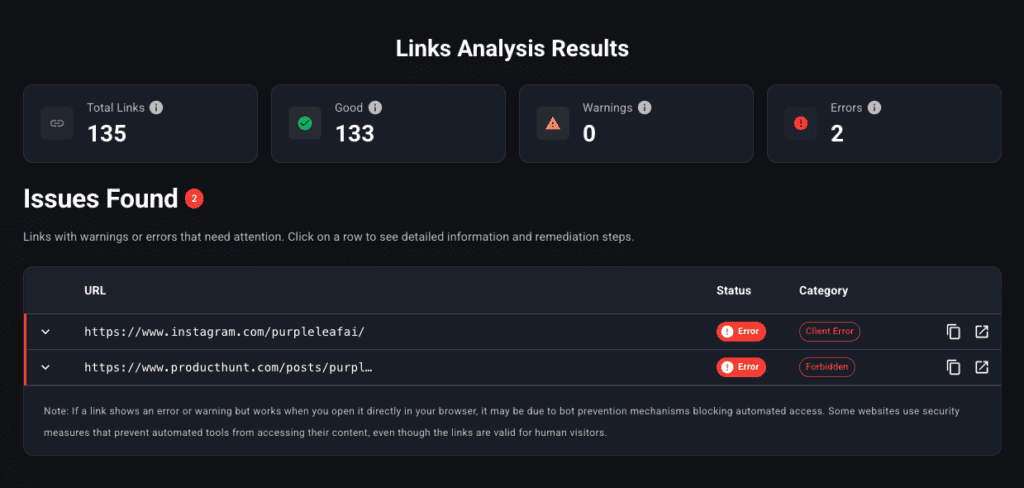
The Page Links Analyzer generates a Links Analysis Report that translates technical checks into practical insights.
The report includes:
- A clear summary of all links found on the page
- A breakdown of links that are healthy versus those that need attention
- A detailed list of affected URLs with the reason each was flagged
Instead of vague warnings, you see exactly which links are problematic and why. This allows teams to:
- Prioritize high-impact fixes first
- Quickly resolve broken or blocked links
- Improve crawl efficiency and user flow
- Maintain consistent link quality across content
Used regularly, the report becomes a proactive quality check rather than a reactive cleanup task.
Why Some Links Work in Browsers but Still Appear as Issues
In some cases, a link may open normally when clicked but still be flagged in the report. This usually happens when destination sites restrict automated access through bot protection or security rules.
While users may reach the page, search engines and AI systems may not. Identifying these cases helps uncover visibility and crawlability gaps that would otherwise remain hidden.
Using the Analyzer Effectively
To get the most value:
- Fix links that completely fail or block access first
- Review unstable or redirected links on important pages
- Scan pages before publishing to prevent issues from going live
- Periodically audit older content as external destinations change
Over time, this ensures link health stays consistent rather than degrading silently.
Final Thoughts: Every Link Is a Signal
Every link on your page sends a signal about quality, reliability, and intent. When those signals break down, both users and search engines notice.
The Page Links Analyzer is part of Purple Leaf, designed to help teams understand how their pages are experienced — and fix link issues before they quietly impact performance.